
Ten Thumbs Typing Tutor

Overall rating:
Ease of Use: 
Effectiveness: 
Help/Support: 
Publisher: Runtime Revolution Ltd
Price: $23.36

Ten Thumbs Typing Tutor teaches the skill of touch typing (typing with all the fingers without looking at the keys) in an accessible step-by-step way.
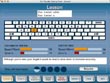
Ten Thumbs has received critical acclaim for its easy-to-use, step-by-step approach to learning keyboard skills. The program is suitable for learners of all ages, and is used in schools, at home, in colleges, universities and industry, including call centers and financial services organizations. Learn using full and proper QWERTY or Dvorak tuition with U.S and British keyboard support.

The rich, customizable feature set includes network support, a range of feedback options and automatic weighting of lessons to get you learning most effectively. A well rounded product with appealing visual interface, additional tips and advice and even tutorials on how to sit at your computer!

Read reviews
Page:
1
Displaying 1-10 of 16 reviews

Good Touch typing tutor, but gets too much sometimes.

By rajassaroy on Mon, 2009-12-07 18:41
Product Rating:
Ease of Use: 
Effectiveness: 
Help/Support: 
Pros: Efficient working, interactive features of kids, useful practice sessions.
Cons: Expensive, unsuitable for adults and professionals, untidy look.
Ten Thumbs Typing Tutor by Runtime Revolutions describes itself as a program suitable for learners of all ages. The techniques described in the software, though are near perfect, the mechanism to...

A-OK If Runtime Revolution uses my suggestions!

By marwolf on Thu, 2009-08-20 06:20
Product Rating:
Ease of Use: 
Effectiveness: 
Help/Support: 
Pros: Very good for learning typing skills in children and anyone who is a beginner to novice! Animation is great for the younger typists!!!
Cons: The keys should be bigger and the ability to change the highlighted key color should be added.
The typing progam is great for beginners to novice and especially anyone that types by L@@KING at their keyboard!! I thought the GUI( General User Interface ) was very entertaining for children and...

Ten Thumbs Typing Tutor: The Kids Will Love Typing!

By yen03 on Fri, 2009-01-16 08:28
Product Rating:
Ease of Use: 
Effectiveness: 
Help/Support: 
Pros: a helpful tip "how to sit correctly when typing", it's easy to find the typing mistake, use encouraging words suggestion on how to correct a mistake, use a good education game (Brick Factory).
Cons: Icon doesn’t automatically appear on the desktop, use a violence game (Safari Park).
After installed the program, the icon should automatically appear on the desktop and Start Menu Program. For me, I can create the shortcut by myself but there are computer users that don’t know in...

A so-so program

By yangpeidong on Fri, 2008-11-21 03:43
Product Rating:
Ease of Use: 
Effectiveness: 
Help/Support: 
Pros: Teaches you how to type. Great analysis of typing.
Cons: Sometimes bad programming (ie extra space makes everything wrong).
I think this program is a bit below average. As an avid typer, I decided to go straight for the expert test. The test, which was quite boring, actually produced some interesting results. I got my son...

Get rid of your "Ten Thumbs" now!

By Dr. Review on Sat, 2008-11-15 19:07
Product Rating:
Ease of Use: 
Effectiveness: 
Help/Support: 
Pros: Great Format and very easy to follow. Will get you typing in no time at all.
Cons: Nothing new to make it more exciting. But, typing "games" aren't usually fun anyways.
This program is very simple to use and can teach people of all ages how to type PROPERLY! At the beginning of the program you can set your goal on how fast you would like to be able to type. You also...

Ten Thumbs Typing Tutor

By wansly123 on Fri, 2007-07-20 03:54
Product Rating:
Ease of Use: 
Effectiveness: 
Help/Support: 
Pros: By following this program you will learn to type. The program does a great job of assesing your ability to type and telling where you can improve.
Cons: This program does not make typing fun. Menus are lengthy and take a long time to navigate.
Hey I can type now! Well actually I could before using this software also, but after using it I still can. I was not extremely impressed with this touch typing software. I personally learned to type...

I think I've really learnt something...

By balance on Thu, 2007-07-19 09:23
Product Rating:
Ease of Use: 
Effectiveness: 
Help/Support: 
Pros: Easy to use, step-by-step learning, auto detection of users' strengths and weeknesses
Cons: Quite repetitive tasks, only a couple of interactive activities
Ten Thumbs Typing Tutor is a good software application that actually takes you from the very beginning. No matter what keyboard you're using (QWERTY or Dvorak), you'll get the chance to practice on...

Ten thumbs to go

By kazashmaza on Sat, 2007-03-17 19:01
Product Rating:
Ease of Use: 
Effectiveness: 
Help/Support: 
Pros: gradually and thoroughly teaches the user how to type efficiently and well.
Cons: not an effective program for more advanced users, quite boring.
Ten thumbs is a fantastic program for absolute beginner typists. It teaches the user where to place each finger on the keyboard and gives plenty of practicing opportunities. I found that this program...

Ten Thumbs Up Typing Tutor

By acdragon on Sat, 2007-03-03 18:59
Product Rating:
Ease of Use: 
Effectiveness: 
Help/Support: 
Pros: Suitable for everyone,very friendly interface easily manage without any hassle.Easily configured to your desired typing speed accuracy,Positive reports for you to be encourage.
Cons: For pros and newbies can be adjusted to a hard or easy speeds so beginners and pros will improve both typing speeds.
User friendly that even kids can manage. Every line has a sense that tries to improve your typing in a way you can easily understand it. So your not just improving your typing but also you improve...

Not that much intresting to learn

By nithin on Tue, 2007-02-27 17:29
Product Rating:
Ease of Use: 
Effectiveness: 
Help/Support: 
Pros: Nice games for childern to learn typing,animated interface for novice to work with,adjustable speed to show our talent,reports to our email.
Cons: Not suitable for professional to improve typing speed,eye strain will be more as after every line a new one will load,more costly
This software consists of some interactive games for helping people leaning typing. But when you consider about learning your typing only one line is displayed at a time and then after that you will...
Page:
1