
Home Plan Pro

Overall rating:
Ease of Use: 
Effectiveness: 
Help/Support: 
Publisher: Home Plan Software
Price: $35.10

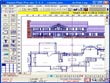
Home Plan Pro helps you draw good-quality, straightforward home plan designs. It features a built-in fax driver; multiple drawing layers; metric or USA measurements; dozens of fill patterns; and hundreds of resizeable figures.

Features:

* Integrated on-line help
* Multiple drawing layers
* Built-in fax driver faxes your plans anywhere in the world
* Metric or USA Measurements
* Dozens of Fill Patterns
* Draw with Mouse and Keyboard
* Hundreds of Resizeable, Rotatable Figures
* Print on any paper your Windows printer driver supports
* Choose drawing colors, line styles, fill patterns, etc.
* Draw objects from a few inches to thousands of feet in size
* Resolutions down to 1/16 of an Inch when zoomed in
* Save Drawing in bitmap or vector format
* Optional, Adjustable Snap Grid
* keep an Activity Log to track your time on each plan
* Fill any Wall with framing, patterns or solid colors
* Calculate Square Feet or Meters
* Clip and Save Sections for Use in Other Drawings
* Delete Drawing Objects or User-defined Sections
* Dozens of Fill Patterns
* Draw with Mouse and Keyboard
* Hundreds of Resizeable, Rotatable Figures
* Measure Cursor Movement with On-screen "Odometers"
* Multiple Line Styles
* Multiple Text Sizes
* Repeat or Clone the Last Action
* Resize All or Part of Drawings
* Undo/Redo the Last Action
* View & Delete Individual Elements from Drawing
* Zoom In or Out

Read reviewsDisplaying 1-6 of 6 reviews

For Home User: cheap, does the job, easy to use.

By valeroma_uk on Sun, 2008-09-14 20:10
Product Rating:
Ease of Use: 
Effectiveness: 
Help/Support: 
Pros: Easy to use. Simple. Precise in drawing walls. Prompt help when needed. The ability to save drawing in different formats. Low Price.
Cons: No 3D. Graphics are not impressing.
In comparison to other software on the market, this seemed a bit under the standard, however, as it was $35 (instead of the $120+ of other software) I decided to give it a try. At first I wasn't too...

professional?

By tinalee on Tue, 2008-07-22 14:38
Product Rating:
Ease of Use: 
Effectiveness: 
Help/Support: 
Pros: Rich functions, user friendly layout, a very good help system making it easy to learn.
Cons: Plain GUI, coarse figures and pictures. Neither 3D effect nor material selection is available. Hence it is impossible to calculate the total expense of the plan automatically.
Although its name is Home Plan Pro, it is too simple to be a professional software. It can only draw 2D figures. The user cannot select different materials to see the different effects. As a result,...

Home Plan Pro: Worth Buying?

By reluctanttaoistmonk on Mon, 2008-02-25 06:02
Product Rating:
Ease of Use: 
Effectiveness: 
Help/Support: 
Pros: basic floor plan elements at one's disposal great calculating tools
Cons: somewhat dull interface arc feature could have used a more flexible approach
The basic floor plan elements at one's disposal is a very big plus for this program since a lot of people are scared to do floor plans on their own. The program's professional look gives one a sense...

Create a professional looking plan without the skill

By kazashmaza on Fri, 2007-03-16 15:44
Product Rating:
Ease of Use: 
Effectiveness: 
Help/Support: 
Pros: the program is very easy to use and the outcome looks extremely professional.
Cons: too simple for professional users or those with more skill. The features are very basic.
I found Home plan pro to be a moderately basic program to use however made the plans look extremely professional without much effort. A series of buttons on the left give you options to add walls,...

Great program for beginners and professionals

By FirefoxHacker on Sun, 2007-02-11 23:46
Product Rating:
Ease of Use: 
Effectiveness: 
Help/Support: 
Pros: Excellent beginners tutorial on how to build a log cabin Links to further document ion on the web, accessible via the help menu. Excellent "tool guide" description. Gives you information on what the tools are and how to use them. Many file export features. The following file formats are supported for exporting: DXF, EMF, BMP, GIF, JPG Ability to Fax plans straight from program Options for converting between feet and metric measurements. Many options available.
Cons: Without warning the help file attempts to contact an unknown. Usually one is prompted before connecting to an outside URL Zoom feature is not very intuitive. Would like to see PDF export. Might have overkilled the options. Too many ways to do something Will need to have an active Internet connection while using the software. Many options available.
Version Reviewed: 5.1.97 Installation: Tarma Installer, Straightforward with not surprises, point and click installation. Big plus on the install. It gives you the...

Design your Plan like a Pro

By dstinsman on Sat, 2006-02-04 05:28
Product Rating:
Ease of Use: 
Effectiveness: 
Help/Support: 
Pros: Comprehensive help features, practical capabilities such as faxing from within the application, good use of screen real estate.
Cons: First-time users may be a bit overwhelmed by the initial complexity of the interface. Practice, practice, practice!
Home Plan Pro is a very functional tool for creating a visual representation of a floor plan. It enables the user to produce a 2-dimensional scale diagram using real-world building elements with...