
PlanBee

Overall rating:
Value For Money: 
Ease of Use: 
Effectiveness: 
Help/Support: 
Publisher: Guy Software
Price: $62.98

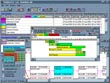
Critical Path Project Management planning tool that is an inexpensive alternative to MS Project. Shows all project data in a spreadsheet pattern for ease of understanding. Independent re-sizeable and hideable windows show PERT views and Gantt (bar chart) views of the project in addition to the spreadsheet view.

PlanBee is easy to use because it's intuitive. If you can use a computer, you can set up a project in PlanBee. It's even easier than most spreadsheet applications, yet with a similar interface. All you have to do is enter the task names, task durations and linkages in the grid and the project is created for you - with the program assuming the most prevalent values about task and linkage characteristics.

Of course, you can overrule these with your own parameters. For example, the program starts off assuming that no work proceeds on Saturdays and Sundays but that it does on every other day. You can specify that some or all tasks must proceed without a break once started (like a continuous pour for concrete). You can define a different working day calendar for any or all years from 1900 to 2100. You can define several standard calendars for use with similar projects in different jurisdictions. You can define several standard calendars for use with similar projects in different jurisdictions. Did you know that while Americans take off the Fourth of July, Canadians take off the First of July and the French take off the Fourteenth of July as national holidays? You can create an American, a Canadian and a French holiday calendar and any others you want to use.

PlanBee Pro adds features for large plans and for use in a corporate environment:

* Resource Allocation and Leveling.
* Costing Functions.
* Administrative Detail Editing (Notes assigned to tasks, Cost Account Codes, Manager Names, Unique Key for use in exporting to external databases).
* Work Breakdown Structure (WBS).
* Choices of languages: and formats: for dates to satisfy national conventions different from those of the Windows version under which it is being run.
* Automatic Emphasis - an aid in selecting exporting details.
* Hiding and Inactivating Dependency Links Grouped into "Families".
* Specifying "Marginal" Criticality.
* Each project may have its own resources list, or master resource lists may be maintained for use across projects.
* Activities may be grouped into up to three levels, with resource cost summaries available at each level.
* A Web Page may be produced automatically including your choice of task details, either in black and white.

Read reviewsDisplaying 1-5 of 5 reviews

PlanBee Pro

By sameera on Sat, 2007-09-29 09:30
Product Rating:
Value For Money: 
Ease of Use: 
Effectiveness: 
Help/Support: 
Pros: * Specifying "Marginal" Criticality. * Each project may have its own resources list, or master resource lists may be maintained for use across projects. * Activities may be grouped into up to three levels, with resource cost summaries available at each level. * A Web Page may be produced automatically including your choice of task details, either in black and white.
Cons: * Administrative Detail Editing (Notes assigned to tasks, Cost Account Codes, Manager Names, Unique Key for use in exporting to external databases). * Work Breakdown Structure (WBS). * Choices of languages: and formats: for dates to satisfy national conventions different from those of the Windows version under which it is being run.
Critical Path Project Management planning tool that is an inexpensive alternative to MS Project. Shows all project data in a spreadsheet pattern for ease of understanding. Independent re-sizeable and...

Need to be improved

By cagrim_mercan on Mon, 2007-08-13 11:04
Product Rating:
Value For Money: 
Ease of Use: 
Effectiveness: 
Help/Support: 
Pros: Only the price.
Cons: Confuses the users. Doesnt seem professional. May be users can accept that, but, if user/engineers/etc. show their works to their bosses/clients they may not trust, because of unprofessional visualisation.
Virtualy, it seems not professional. When I opened it first time, I thought this was still in developing progress. Too much colourful. There are so many notes, description on the bars, but, they are...

Usefull, but hard to understand

By Daniel M on Sun, 2007-04-29 18:00
Product Rating:
Value For Money: 
Ease of Use: 
Effectiveness: 
Help/Support: 
Pros: Great charts and good looking report generation. When you learn how to use it, it is quite effective.
Cons: The interface needs a makeover.
At first when you launch it, the interface throws you 10 feet backwards. It looks so confusing! But if you spend just 25 minutes to play with it, you finally get the idea. When you add items to the...

MS Project with out the MS

By drumnstar182 on Tue, 2007-04-10 02:49
Product Rating:
Value For Money: 
Ease of Use: 
Effectiveness: 
Help/Support: 
Pros: PlanBee project management planning tool is a inexpensive alternative to MS Project. Easy to use, it shows all project data in a explicit manner, using a spreadsheet pattern for ease of understanding.
Cons: If you already have MS Project, this is more money to spend
PlanBee is a Critical Path Project Management planning tool. It is a less expensive alternative to MS Project. It is more powerful and helpful because it was not designed by Microsoft, but by project...

Lets Just Cross That Bridge When We Get to It

By thepinkbandit on Fri, 2006-07-14 07:44
Product Rating:
Value For Money: 
Ease of Use: 
Effectiveness: 
Help/Support: 
Pros: Workflow Diagramming
Cons: Lack of customization. Technological redundancy. User Interface
After using PlanBee, I’m glad that I get to trudge back to my spreadsheets and task manager back at the office. Atop the list of PlanBee’s shortcomings is the user interface. The software lacks...